
How it works
How If You Read This works, step by step.
If You Read This is a check-in app. You open it once a day, or on a schedule you choose. If you ever stop, it reminds you first. If you still do not open it, it texts the message you wrote to the people you picked.
Setting it up
Setup takes about five minutes, and you only do it once.
- Sign in with your phone number. You get a code by text. There is no password to remember. US and Canadian numbers are supported.
- Write your message. Say what you would want someone to know if you could not tell them yourself. Practical (where you went, who to call, where the spare key is), personal, or both. You can change it whenever you like.
- Add your contacts. A name and a phone number. Each person gets a short welcome text saying you added them, and they never need the app. The free plan includes one contact; Pro and Max include as many as you want, each with their own message.
- Choose your window and reminders. The free plan uses a 24-hour window. Pro and Max let you choose: 1 hour, 3 hours, 6 hours, 12 hours, 24 hours, 2 days, 3 days, 1 week, 2 weeks, 1 month.
Checking in: you just open the app
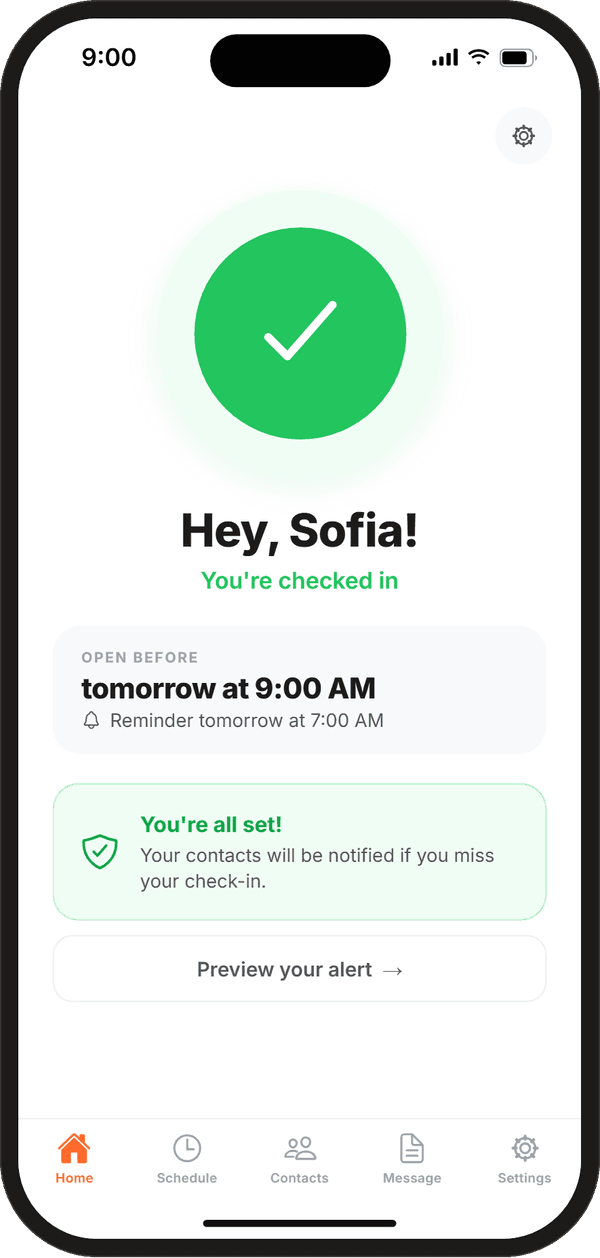
There is no button to press. Opening the app is the check-in. It records the time, restarts your timer and moves your deadline forward. The home screen then shows when to open it next, for example “Open before tomorrow at 9:41 PM”, and when your next reminder will come.
Coming back to the app from the background counts too. If you can open your phone, you can check in, in about a second.
Quiet hours. If you use a short window (12 hours or less) on Pro or Max, you can set quiet hours. Your sleep does not count against the clock: the countdown pauses at bedtime and picks up again when you wake, so a short window never runs out while you sleep.
Reminders come before the deadline
Reminders are the grace period. They all arrive before your deadline, by push notification and by text message (or push only, if you prefer).
- Free: one reminder at a time you choose, such as 2 hours before.
- Pro and Max: up to three reminders at times you choose.
- Every plan: an automatic final reminder 30 minutes before the deadline. It is skipped if one of your own reminders already lands within 10 minutes of it.
Open the app after any reminder and the clock starts over. Nothing is sent and nobody is told.
When the deadline passes
If the deadline passes and you have not opened the app, your check-in is marked as missed within a minute and your message goes out to each contact by text. There is no extra waiting period after the deadline; the reminders came first. If a text does not go through on the first try, it is retried automatically.
Because the deadline is kept on our servers, this works even if your phone is off, out of battery, lost or broken. You also get a notification on your phone telling you that your messages went out.
Example, on the free plan: you open the app on Monday at 9:00 PM. Your reminder comes Tuesday at 7:00 PM, the final reminder at 8:30 PM, and if you still have not opened it, your contact gets your message at about 9:00 PM.
What your contacts receive
Each contact gets one text from If You Read This. It names you, explains that you missed your check-in, and gives them the message you wrote for them, word for word.
Free
Pro: with location
Max: with files
- Location (Pro and Max): a map link to your last known location, the place where you last opened the app.
- Files (Max): photos, videos, audio and other files open through a private link. To open it, your contact enters the last four digits of the phone number the text was sent to. After five wrong tries the link locks. If they lose the text, they can find their message again with their full phone number and a code we text them.
- No app needed: contacts never need to install anything or make an account, and they can reply STOP to any of our texts.
What it does not do
- It never calls emergency services. It reaches the people you chose. Your message can tell them to call for help, and where to send it.
- It does not track you. Location, on Pro and Max, is only the place where you last opened the app.
- It does not send anything early. Nothing goes out until your deadline passes and every reminder has been missed.
- It is not a medical device and does not detect falls or emergencies. It notices one thing: that you have gone quiet.
Works with US and Canadian phone numbers. The app is free, with optional Pro and Max plans.
Questions
The edge cases.
What if my phone is dead, lost or broken?
Your deadline is kept on our servers, not on your phone. If the deadline passes while your phone is off, out of battery or smashed, your message still goes out on time. Reminders need your phone to arrive, but the alert does not.
What if I have no signal when my deadline passes?
Signal only matters for checking in. If you cannot open the app before the deadline because you are out of range, the deadline passes and your message is sent. That is why you choose a window that fits what you are doing: a 3-hour window for a short ride, a 2-day window for a long trip.
Can I pause it, for example on vacation?
You do not need to. Just pick a longer window in the app (Pro and Max go up to 1 month), or keep opening the app as usual. Opening it from anywhere with a connection counts.
Will it send a message by accident?
Only if you miss your deadline and every reminder before it. Before anything is sent you get the reminder you chose and an automatic final reminder 30 minutes before the deadline, by push notification and text. Opening the app at any point stops it.
Can I see what my contacts will receive?
Yes. The app shows a preview of the exact text each contact will get, so there are no surprises.
Does it track my location?
No. On Pro and Max the alert can include your last known location, which is the place where you last opened the app. It is saved when you check in. The app does not track you in the background, and the free plan never includes location.


More answers in the FAQ.
Got a text from If You Read This?
Someone who cares about you chose you as a contact. You do not need the app or an account, and you can reply STOP at any time. If they ever miss a check-in, their message comes to you in a text. If they also left photos or files, the text includes a private link, and you can find it again here if you lose it.
Free to start
Set it up in five minutes.
Write your message, choose who gets it, and open the app once a day. If you ever stop, the people who matter most will hear from you.
Free plan forever. Works with US and Canadian phone numbers.